CasperSecurity
# colors.js
[](https://travis-ci.org/Marak/colors.js)
[](https://www.npmjs.org/package/colors)
[](https://david-dm.org/Marak/colors.js)
[](https://david-dm.org/Marak/colors.js#info=devDependencies)
Please check out the [roadmap](ROADMAP.md) for upcoming features and releases. Please open Issues to provide feedback, and check the `develop` branch for the latest bleeding-edge updates.
## get color and style in your node.js console
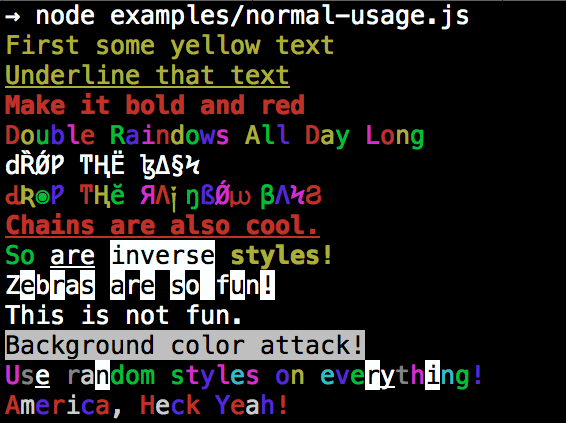
## Installation
npm install colors
## colors and styles!
### text colors
- black
- red
- green
- yellow
- blue
- magenta
- cyan
- white
- gray
- grey
### bright text colors
- brightRed
- brightGreen
- brightYellow
- brightBlue
- brightMagenta
- brightCyan
- brightWhite
### background colors
- bgBlack
- bgRed
- bgGreen
- bgYellow
- bgBlue
- bgMagenta
- bgCyan
- bgWhite
- bgGray
- bgGrey
### bright background colors
- bgBrightRed
- bgBrightGreen
- bgBrightYellow
- bgBrightBlue
- bgBrightMagenta
- bgBrightCyan
- bgBrightWhite
### styles
- reset
- bold
- dim
- italic
- underline
- inverse
- hidden
- strikethrough
### extras
- rainbow
- zebra
- america
- trap
- random
## Usage
By popular demand, `colors` now ships with two types of usages!
The super nifty way
```js
var colors = require('colors');
console.log('hello'.green); // outputs green text
console.log('i like cake and pies'.underline.red) // outputs red underlined text
console.log('inverse the color'.inverse); // inverses the color
console.log('OMG Rainbows!'.rainbow); // rainbow
console.log('Run the trap'.trap); // Drops the bass
```
or a slightly less nifty way which doesn't extend `String.prototype`
```js
var colors = require('colors/safe');
console.log(colors.green('hello')); // outputs green text
console.log(colors.red.underline('i like cake and pies')) // outputs red underlined text
console.log(colors.inverse('inverse the color')); // inverses the color
console.log(colors.rainbow('OMG Rainbows!')); // rainbow
console.log(colors.trap('Run the trap')); // Drops the bass
```
I prefer the first way. Some people seem to be afraid of extending `String.prototype` and prefer the second way.
If you are writing good code you will never have an issue with the first approach. If you really don't want to touch `String.prototype`, the second usage will not touch `String` native object.
## Enabling/Disabling Colors
The package will auto-detect whether your terminal can use colors and enable/disable accordingly. When colors are disabled, the color functions do nothing. You can override this with a command-line flag:
```bash
node myapp.js --no-color
node myapp.js --color=false
node myapp.js --color
node myapp.js --color=true
node myapp.js --color=always
FORCE_COLOR=1 node myapp.js
```
Or in code:
```javascript
var colors = require('colors');
colors.enable();
colors.disable();
```
## Console.log [string substitution](http://nodejs.org/docs/latest/api/console.html#console_console_log_data)
```js
var name = 'Marak';
console.log(colors.green('Hello %s'), name);
// outputs -> 'Hello Marak'
```
## Custom themes
### Using standard API
```js
var colors = require('colors');
colors.setTheme({
silly: 'rainbow',
input: 'grey',
verbose: 'cyan',
prompt: 'grey',
info: 'green',
data: 'grey',
help: 'cyan',
warn: 'yellow',
debug: 'blue',
error: 'red'
});
// outputs red text
console.log("this is an error".error);
// outputs yellow text
console.log("this is a warning".warn);
```
### Using string safe API
```js
var colors = require('colors/safe');
// set single property
var error = colors.red;
error('this is red');
// set theme
colors.setTheme({
silly: 'rainbow',
input: 'grey',
verbose: 'cyan',
prompt: 'grey',
info: 'green',
data: 'grey',
help: 'cyan',
warn: 'yellow',
debug: 'blue',
error: 'red'
});
// outputs red text
console.log(colors.error("this is an error"));
// outputs yellow text
console.log(colors.warn("this is a warning"));
```
### Combining Colors
```javascript
var colors = require('colors');
colors.setTheme({
custom: ['red', 'underline']
});
console.log('test'.custom);
```
*Protip: There is a secret undocumented style in `colors`. If you find the style you can summon him.*